
VBA 32-bit to 64-bit Declare Converter
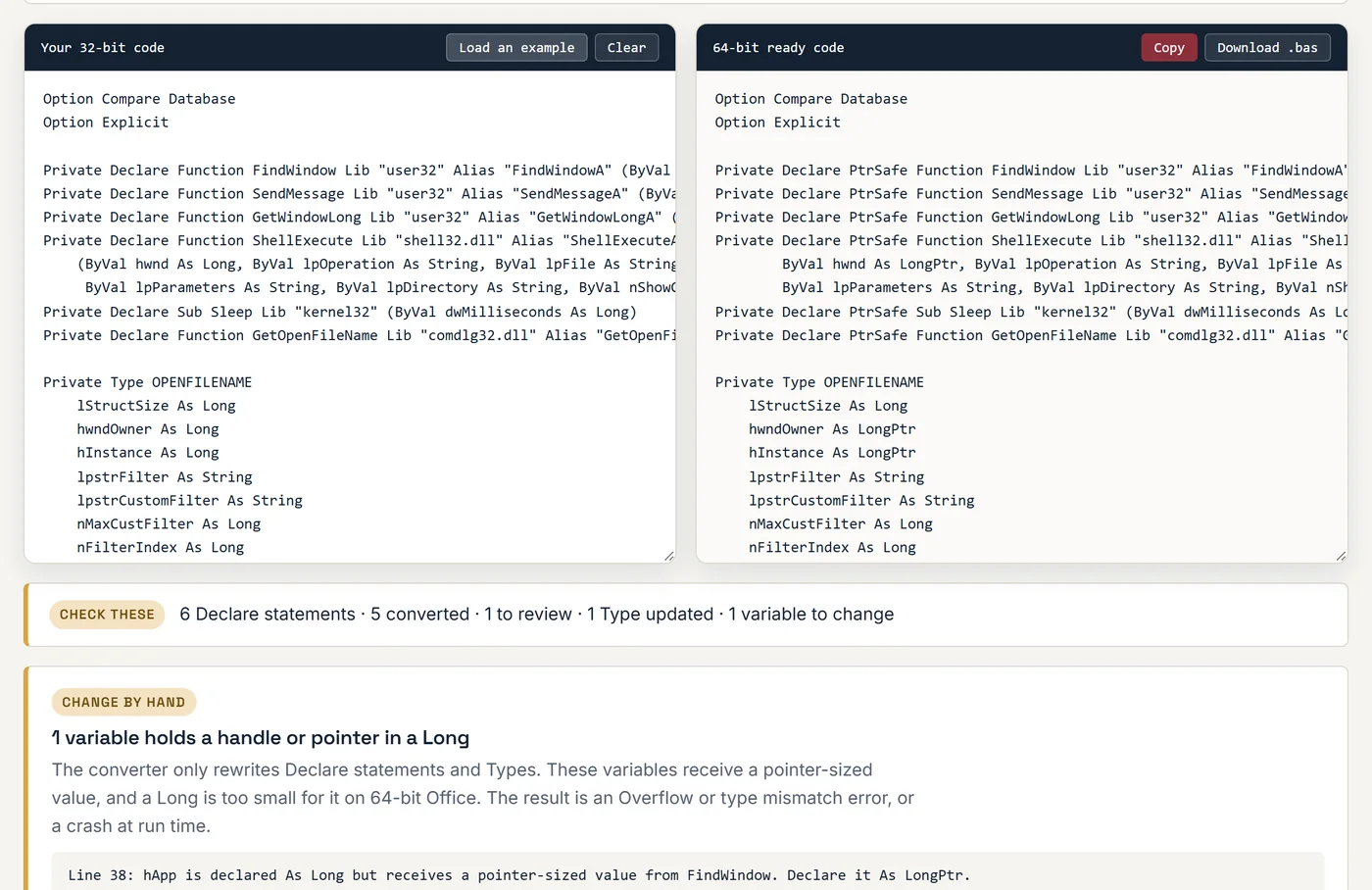
Paste your Declare statements, or the whole module. You get PtrSafe versions with LongPtr in the right places, checked against Microsoft's own API list. Your code stays in your browser.
Converted in this browser tab. Your code is not uploaded or stored. Always compile (Debug > Compile) and test on 64-bit Office before you ship it.
More than adding PtrSafe
Adding the keyword makes the error go away. Getting the types right is what stops the crash afterwards.
-
STEP-01
Adds PtrSafe
Every Declare statement gets the PtrSafe keyword, which 64-bit Office requires before it will compile the module.
-
STEP-02
Changes the right Longs to LongPtr
Handles and pointers become LongPtr. Counts, flags and sizes that are still 32-bit stay Long. The decision comes from Microsoft's own list of 1,500 API declarations, not from guessing.
-
STEP-03
Fixes Type blocks
Structures such as OPENFILENAME, MSG and SHELLEXECUTEINFO have handle fields too. Those fields are updated, so the structure keeps the layout Windows expects.
-
STEP-04
Points at the variables
If your code stores a window handle in a Long variable, the report lists the line. That is the part most guides leave out.
Converting VBA API calls to 64-bit by hand
The rules the converter follows, so you can check its work or fix the declarations it could not confirm.
Why the code broke
Microsoft 365 has installed as 64-bit by default since 2019. An Access database or Excel workbook written years ago on 32-bit Office opens fine until VBA reaches a module with a Declare statement. Then it stops with the 64-bit compile error. The form buttons that call that module stop working with it.
A Declare statement describes a function inside Windows: its name, the DLL it lives in, and the size of every value passed in and out. In 32-bit Office a window handle or a memory address is 4 bytes, so everyone declared them As Long. In 64-bit Office they are 8 bytes. VBA has no way to know which of your Longs are really handles, so it refuses to compile until you say you have checked.
The three rules
- Add PtrSafe after Declare.
Declare FunctionbecomesDeclare PtrSafe Function. This is required for every declaration, even ones with nothing else to change, such as Sleep. - Change handles and pointers to LongPtr. That means anything Windows documents as HWND, HANDLE, HDC, HINSTANCE, HKEY, LPARAM, WPARAM, LRESULT, SIZE_T or a pointer. Parameters named hWnd, hDC or lpSomething are the usual ones, and so is the return value of functions like FindWindow.
- Leave real 32-bit values as Long. DWORD, UINT, BOOL and int are still 32 bits in 64-bit Windows. Changing nCmdShow or dwMilliseconds to LongPtr is wrong, even though it often appears to work.
An example
The 32-bit declaration:
Private Declare Function SendMessage Lib "user32" Alias "SendMessageA" _
    (ByVal hwnd As Long, ByVal wMsg As Long, ByVal wParam As Long, lParam As Any) As Long
The 64-bit ready version. The message number stays Long, and the handle, wParam and the result become LongPtr:
Private Declare PtrSafe Function SendMessage Lib "user32" Alias "SendMessageA" _
    (ByVal hwnd As LongPtr, ByVal wMsg As Long, ByVal wParam As LongPtr, lParam As Any) As LongPtr
Then follow the values through your code
The declaration is only half the job. If FindWindow now returns a LongPtr and your procedure has Dim hWnd As Long, the code fails in 64-bit Office with an Overflow or type mismatch error as soon as the handle is too large for a Long. Every variable, function argument and Type field that carries a handle needs the same change. The converter lists the ones it can see in the code you pasted.
Callbacks need a look too. A procedure passed with AddressOf, for example to SetTimer or EnumWindows, must use LongPtr for its handle and pointer arguments, or Office crashes without any error message.
What a converter cannot fix
Some things have no 64-bit version: older ActiveX controls, 32-bit COM libraries, and DLLs written for one program years ago. Those need a replacement, not a new declaration. If the report flags a library, or your database still fails after the declarations compile, that is the kind of work we do in VBA programming and repair and when upgrading a database to current Access.
Questions about 64-bit VBA
What does "The code in this project must be updated for use on 64-bit systems" mean?
It is a compile error from 64-bit Office. Your VBA project calls a Windows API function through a Declare statement that was written for 32-bit Office. The full message goes on: "Please review and update Declare statements and then mark them with the PtrSafe attribute." Nothing is wrong with your data. The module will not run until each Declare is updated, which is what this converter does.
Is adding PtrSafe enough to make VBA code 64-bit compatible?
No, and this is the most common mistake. PtrSafe only tells VBA that you have checked the declaration. If a window handle or a memory pointer is still declared As Long, the code compiles and then crashes Access or Excel at run time, because a 64-bit pointer does not fit in a 32-bit Long. Each handle and pointer also has to become LongPtr.
What is the difference between Long, LongPtr and LongLong?
Long is always 32 bits. LongLong is always 64 bits and only exists in 64-bit Office. LongPtr is not a real type: it turns into Long in 32-bit Office and LongLong in 64-bit Office. That is why LongPtr is the right choice for handles and pointers. The same line of code then works in both.
When should I use #If VBA7 and when #If Win64?
VBA7 is true in Office 2010 and later, 32-bit or 64-bit. Use it to separate code for Office 2007 and older, which does not know PtrSafe or LongPtr. Win64 is true only in 64-bit Office. You need it in the few cases where the 64-bit API is different, such as GetWindowLongPtr or functions that take a POINT by value. For most declarations, PtrSafe with LongPtr needs no #If at all.
Will the converted code still work in 32-bit Office?
Yes, in Office 2010 and later. PtrSafe and LongPtr are understood by both the 32-bit and 64-bit versions. If some users are still on Office 2007 or 2003, choose the second option above the code box. It keeps your original lines in an #Else branch for them.
What does "Review" mean next to a declaration?
It means the converter could not confirm the result against Microsoft's list. Usually the function is from a third-party DLL or a less common Windows API. PtrSafe is added, and parameters with names like hWnd or lpBuffer are changed to LongPtr, but you should check each parameter against the API documentation. A few functions are flagged because they need a different declaration in 64-bit Office.
What else do I need to change besides the Declare statements?
Three things. Variables that hold a handle or pointer must be LongPtr, including the ones you pass between your own procedures. Type structures passed to the API need the same treatment. And anything that only exists in 32-bit will not load at all: old ActiveX controls, 32-bit COM DLLs and 32-bit ODBC drivers each need a 64-bit replacement.
Is my code sent to a server?
No. The conversion runs in your browser with JavaScript. Your code is not uploaded, logged or stored, so it is safe to paste code from a client project. The only thing the page reports back is an anonymous count that the converter was used.
Database still failing on 64-bit Office?
Send me the error message and the Office version, and I will tell you what it takes to fix.