
Excel to Access Readiness Checker
Drop in the spreadsheet you have outgrown. See what would go wrong when it becomes a database, cell by cell, and get a table design to start from. Your file never leaves your computer.
Drop your Excel file here
.xlsx, .xlsm or .csv
- Checked in your browser. Nothing is uploaded.
- No signup, no row paywall.
- Works without Access installed.
The things an import does not warn you about
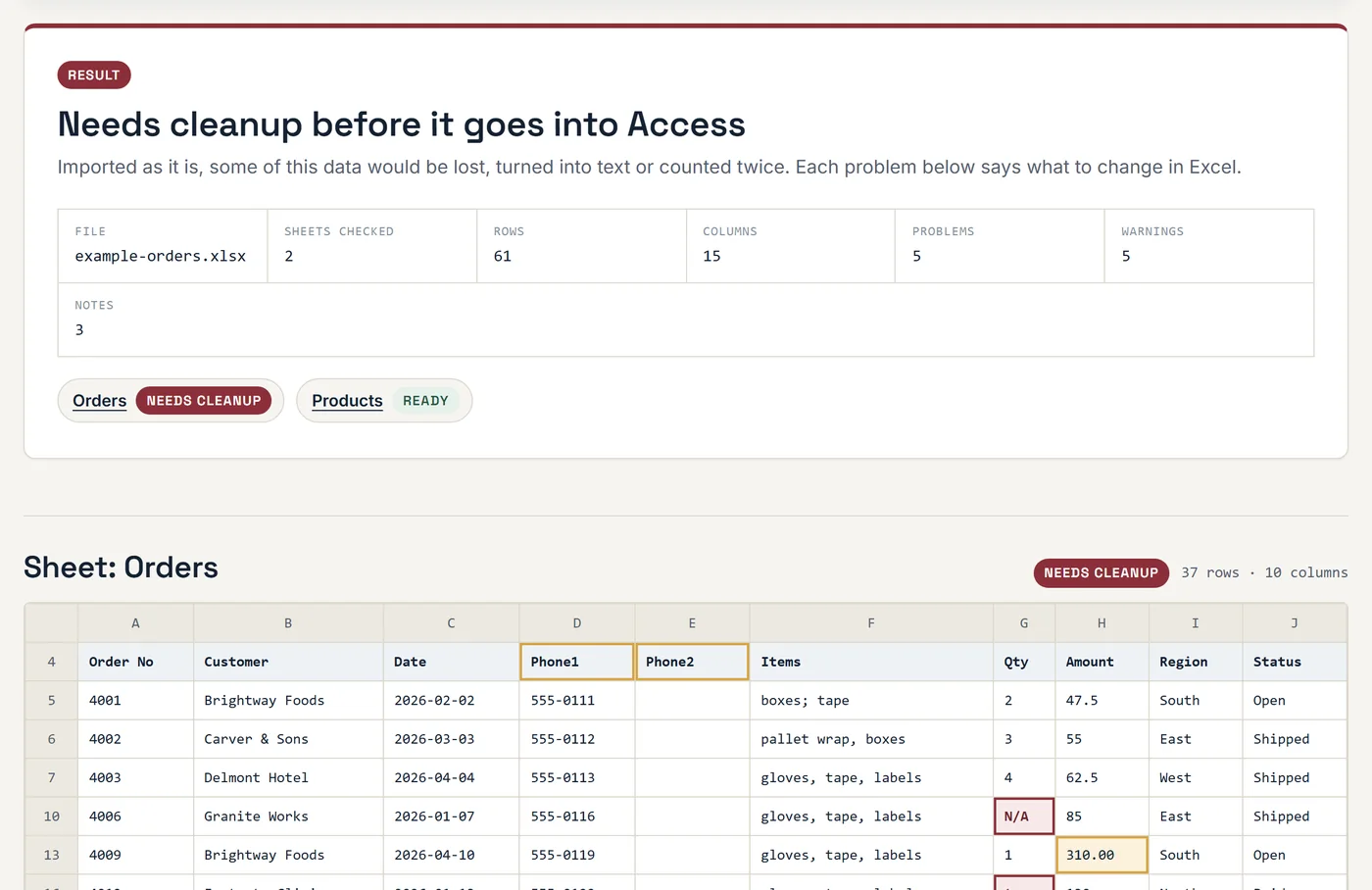
Access will import almost any sheet without an error. These are the checks that tell you whether the result can be trusted.
-
CHK-01
Headings in the wrong place
Titles, logos and notes above the table, blank headings, and the same heading used twice.
-
CHK-02
Merged cells
Merged headings and merged data cells, which leave blank fields after import.
-
CHK-03
Mixed data types
A word in a number column, or "N/A" and "-" typed where a number or date belongs.
-
CHK-04
Numbers and dates stored as text
Values that look right in Excel but will not add up, sort or filter in a database.
-
CHK-05
Total and blank rows
Subtotal rows and empty rows inside the data, which become fake records.
-
CHK-06
Spreadsheet-shaped design
Phone1, Phone2, Phone3 columns, months across the top, and several values in one cell.
-
CHK-07
Duplicates and missing keys
Rows entered twice, and whether any column identifies each record.
-
CHK-08
A table design to start from
Suggested field names and Access data types for every column, with the SQL to create the table.
Getting a spreadsheet ready for Access
What each result means, and the order to fix things in.
Fix the layout first
A database table is a plain grid: one row of headings, then one record per row, and nothing else. Most spreadsheets are part table and part report, so the first job is to strip the report away.
- Move the headings to row 1. Delete the company name, the title and any notes above them.
- Give every column one heading. No blanks, no repeats, and no headings that span several columns.
- Unmerge everything. Then fill the value down so each row carries its own copy.
- Delete total, subtotal and blank rows. Access works out totals when you ask for them.
Then make each column one kind of data
Sort a column and look at the top and bottom: the cells that do not belong float to the ends. Replace "N/A", "-" and "TBD" with an empty cell, because empty already means "no value". Type numbers as numbers, without units, so "12 kg" becomes 12 in a column headed Weight (kg). For dates held as text, select the column and use Data > Text to Columns > Finish, then check that day and month did not swap.
Decide what to do about the design warnings
Layout problems have one right answer. Design warnings are choices. Numbered columns, months across the top, and cells holding a list all mean the sheet is really two tables squeezed into one. You can import it as it is and live with the limits, or split it now. Splitting is more work on the first day and saves it every day after, because the database can then answer questions the sheet never could.
Importing
When the report says ready, open Access and choose External Data > New Data Source > From File > Excel. Tick "First Row Contains Column Headings", and let Access add a primary key unless your sheet has its own unique number. To control the field types yourself, create the table from the SQL in the report first, then import into that table.
What the checker cannot decide
It reads what is in the cells. It does not know which sheets belong together, which column should link to which, or what your team needs to see on screen. Those decisions are where a database is won or lost, and they are the main part of our Excel to Access conversion work. If you are not sure Access is the right move at all, the two-minute quiz covers that from the other side.
Questions about moving from Excel to Access
Is my spreadsheet uploaded?
No. The file is opened by a script running in your browser tab, and its contents never leave your computer. The page only reports back an anonymous count that a check was run. You can switch off Wi-Fi after the page loads and the checker still works.
Why can't I just import my Excel file into Access?
You can, and for a clean list it works well. The trouble is that a spreadsheet lets anything go in any cell, and a database does not. One "N/A" in a column of numbers turns the whole column into text. A merged cell leaves blank fields. A total row becomes a record. The import finishes without complaining, and the problems show up weeks later as wrong totals.
What does "mixed data types" mean?
An Access field holds one kind of thing: numbers, dates, text or yes/no. If a quantity column has 5, 12 and "two", Access has to pick one type for all of them. It either makes the field text, so you can no longer add it up, or it keeps it as a number and throws the odd cells away. The report lists the exact cells so you can correct them first.
Why are Phone1, Phone2, Phone3 columns a problem?
They work until someone has a fourth number, and searching for a number means looking in three places. In a database the phone numbers go in their own table, one row per number, linked to the person. Then there is no limit, and one search finds any number. The same applies to months across the top of a sheet and to cells that hold a list of values.
How many rows can Excel hold before I need Access?
Excel allows just over a million rows, but the practical limit comes much sooner. Sheets get slow and fragile somewhere past 50,000 to 100,000 rows with formulas, and long before that if several people need to edit at once. The better signal is not the row count. It is when you start keeping the same information in two sheets, or when two people overwrite each other's changes.
Which files does the checker read?
Excel workbooks (.xlsx and .xlsm) and .csv files. Every visible sheet with a table is checked, up to 20,000 rows per sheet. An older .xls file can be opened in Excel and saved as .xlsx first. A workbook locked with a password has to be unlocked before it can be read.
Can I use the suggested table design as it is?
For one tidy sheet, yes: create the table from the SQL, then import the sheet into it. Treat it as a starting point when the report shows design warnings. Numbered columns, repeated lists and several values in one cell each call for a second table and a relationship, and that part is a design decision the checker cannot make for you.
Did this work for you?
Your answer goes straight to the person who built the tool. It is not published.
Rather hand over the spreadsheet and get back a database?
Send me the report summary and a line about who uses the sheet and what they do with it. I will tell you what the database should look like and what it takes to build.